About
We’re excited to share the latest improvements to the Map! We’ve made a number of enhancements that will make managing and finding your assets an updated, seamless experience.

We’ve introduced several important changes, including scoped search, improved filtering, reimagined layout, enhanced fleet visibility, and improved management with layers.
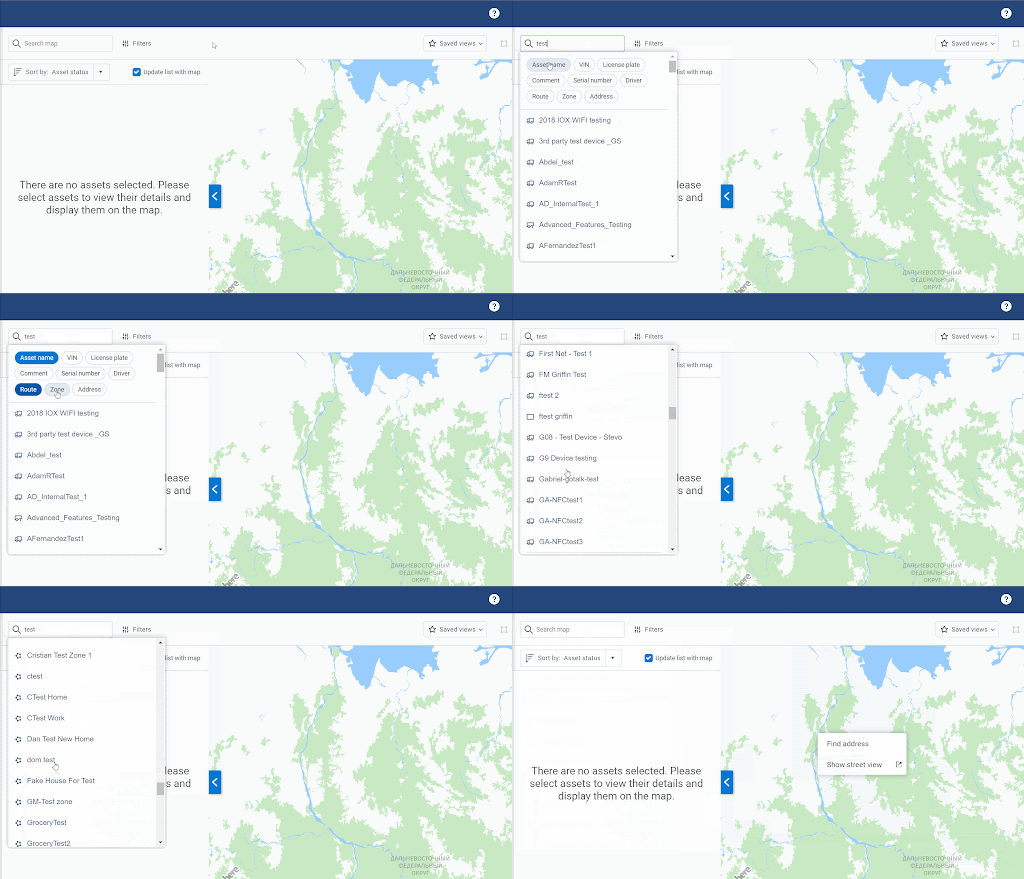
- Scoped search: You can now limit your search results to specific assets, drivers, zones and more.
- Improved filtering: Finding and adding filters has been simplified using the filter panel, and filters you’ve applied are highlighted on the page for ease of access.
- New layout: The Add Zone and Add Route buttons have been relocated to the side of the map under the Zoom options to streamline your view of the map.
- Enhanced fleet visibility: When filtering, each asset will now display its corresponding group color, allowing you to instantly visualize your fleet’s organization and identify asset groupings.
- Layers view management: Customize your map using the new layer controls. You can toggle map elements such as assets, zones, and routes on or off, allowing you to customize your map view to focus on what’s important to you.
We’ve also made some ease of use improvements based on the valuable feedback you’ve provided for us such as reducing erratic behavior and smoothing issues when using zoom on the map. Location sharing has also been updated to allow links to be shared for a custom duration and make specifying a destination optional.
The mobile Map experience has also been enhanced, with significant visual improvements to make your experience navigating the map easier than ever.
The new search for map has been given a new superpower: scoped search. This allows you to limit your results to an asset, driver, zones and more! Selecting a result from this search will take you directly to a focused view for more details.
More filters are available to help find exactly what you want in your fleet, and it's easier than ever to see which options are active. Don’t see a filter that you’d like included? We will be adding to this list in the future so let us know!
We’ve re-imagined how filtering is performed on the map, only to show you what matters to your operations. We start with showing you all the filter options, then continue to show the filters that you’ve applied on the screen.

Instantly visualize your fleet's organization and quickly identify asset groupings on the Map with our new color-coding for Groups. When filtering, each asset's icon will now display its corresponding Group color. This enhancement provides an at-a-glance understanding of your fleet's structure and helps improve location identification.
If you filter by a group nested within a parent group, it will inherit the color of its parent group. You may notice that some of the assets may reference the colour of the parent group instead.

To help you focus on what matters most, you can now customize your map view using the new layer controls. You can choose exactly what you want to see on the map at any time by easily toggling different layers on or off — such as your Assets, Zones, Routes, and even live Traffic or Weather.
This feature allows you to declutter your map and create a view that is tailored to your immediate operational needs, helping you find critical information more efficiently.

The new Map experience will become the default experience for all users gradually through July
Previous Release Notes
About