About
We are improving how you manage and view connected equipment by bringing linked asset information directly into your primary workflow.
We are adding a new Linked assets column to the Assets page to provide immediate clarity on asset pairings. This update will integrate data from two primary sources:
- Hours of Service (HOS) compliance: Information is populated when drivers use the Geotab Drive™ app to record the specific trailers they are pulling.
- Automatic linking: Our co-location algorithm identifies multiple assets traveling together and automatically displays those associations.
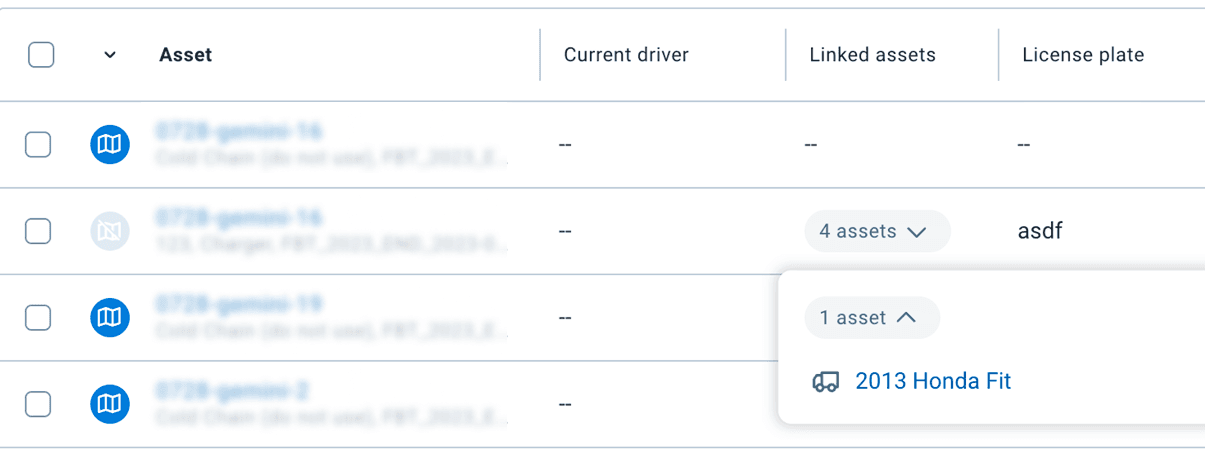 Note: To keep your workspace clean, the column is hidden by default for databases with no linked assets. If links are present, the column appears automatically to ensure you have the information you need.
This change is particularly beneficial for transportation, logistics, and field service fleets that rely on truck-trailer or vehicle-equipment combinations. By centralizing this information, you no longer have to navigate through multiple menus to confirm which assets are paired.
To maintain the integrity of your compliance data, link statuses cannot be modified within the MyGeotab fleet management view. This ensures that HOS records remain accurate and tamper-proof for regulatory purposes. The goal is to provide a single, reliable view of your fleet inventory and its current operational state.
This update will become available to all users in March, 2026.
Previous Release Notes
About