Sobre
We are continuously refining Trips History to make your everyday workflows as smooth as possible. This latest update delivers a more seamless experience by bringing total consistency between your trip history and the map view.
Stop numbers now match perfectly across your map, trip cards, and the replay bar for absolute clarity. To keep your map clean, nearby stops that used to overlap are now grouped together into a cluster, simply click it to open a clear pop-out menu of all stops at that location.

Based on your workflow needs, you can now select multiple trips simultaneously. This restores the multi-vehicle select capability so you can review and compare multiple trip routes at once.

This tool is vital for reviewing incidents. To ensure a cleaner workspace, we have added a permanent show/hide toggle button in the bottom-right corner so you can dismiss or reveal the interface whenever you need to.
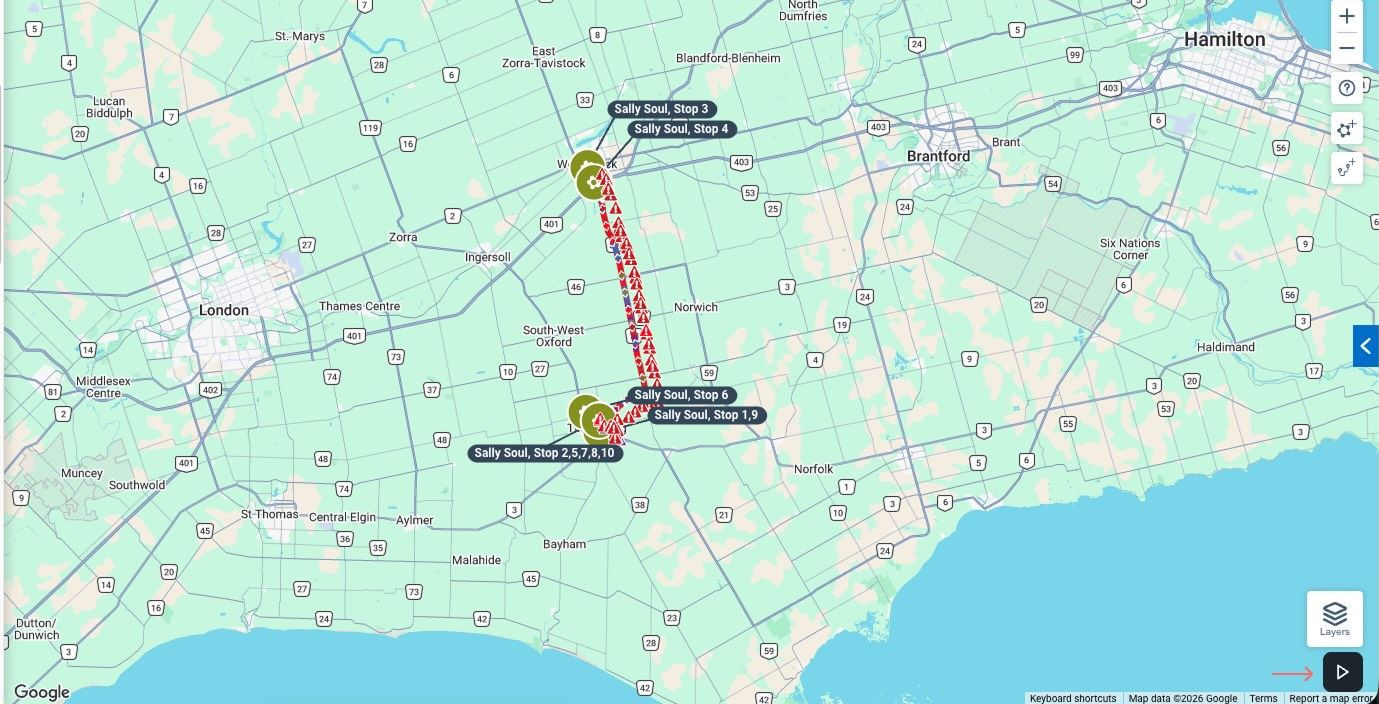

We recently tested using grey lines to show the remainder of a vehicle's daily trips while you viewed a specific segment. Because this caused more confusion than clarity for users trying to orient themselves, we have removed this feature to keep your map view clean.

We are committed to making your daily operations seamless. We continue to actively monitor feedback and resolve bugs to ensure the redesigned Trips History remains a highly reliable tool for your day-to-day fleet management.
Sobre